
Features
Everything a club needs – and modules for what only some need
The core features are part of every licence. Modules are enabled per club – a flying club without a school does not pay for the training record.
Core features
In every licenceReserve, fly, invoice: the core every club needs.
Reservations
Calendar per aircraft, fleet overview, "I want to fly", waiting list with promotion, cancellation reason, state (confirmed, provisional, declined).
Help →Safety rules
Check-flight deadline, last flight with the club, instructor requirement for students, maintenance reservations. The club configures, the reservation enforces.
Help →Logbook and flight times
Enter hour meter and landing time, flight and block time are computed. Briefing and debriefing time per entry, club check flight and official proficiency check.
Help →Invoice run and accounting
All club invoices with preview and breakdown, QR bill by e-mail and push, open items, instructor statements, exports CSV/MT940/ISO 20022, VAT and instructor social-insurance report as PDF - with the reconciliation "every passenger flight with its receipt".
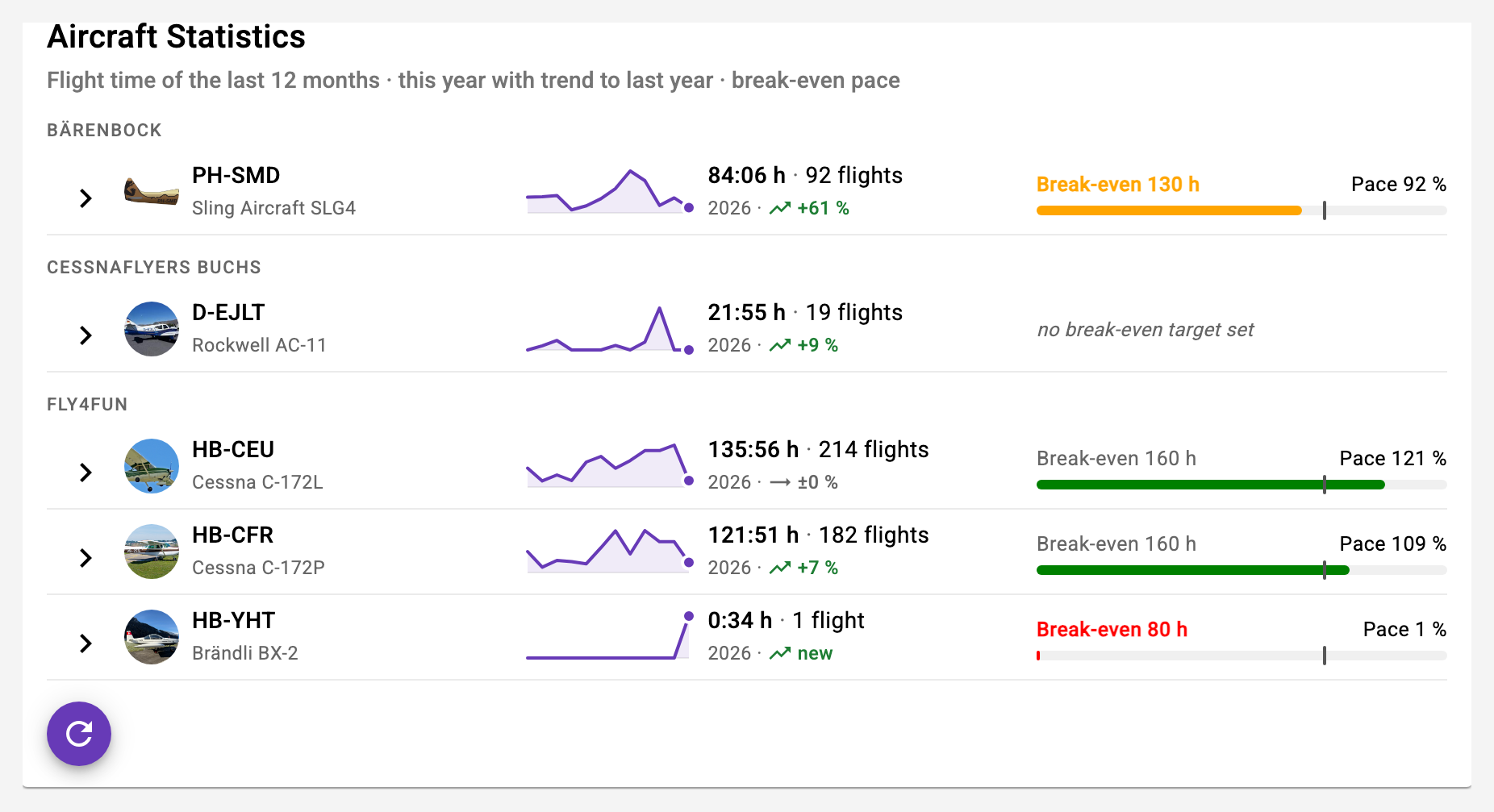
Help →Aircraft statistics
Hours, revenue and break-even as a course per aircraft – for the club owner.
Help →Member statistics
Open invoices, due check flights and expiring packages in three tabs, with a jump to the member profile.
Help →Billing packages and discounts
Hour packages members buy themselves; discounts per member; reminder 30 days before a package expires.
Vouchers
Flight-hour, sightseeing and trial-flight vouchers with number and club prefix, PDF, status open/redeemed/paid – redeemed right in the logbook.
Help →Away-airfield fuel
Refuelled elsewhere? The receipt is credited on the pilot's invoice.
Validations
Club validations (check flight, last flight) plus each member's own deadlines (medical, LPC, licence). Expiry visible on the dashboard.
Help →Members and roles
Owners, instructors, pilots, students, sightseeing pilots; invitation by e-mail; emergency contacts maintained by each member.
Help →Push and e-mail
Notifications configurable per type: reservations as instructor, lesson requests, waiting list, invoices. One tap opens the item – even after a deleted reservation.
Help →Calendar subscription
Personal iCal feed for Apple, Google or Outlook calendars, including the reservation's state.
Help →capzlog.aero
Logbook entries straight into the FOCA-approved digital logbook if you wish, with proficiency-check marker.
Help →FADP disclosure
The club owner creates the full data disclosure under Art. 25 FADP as a PDF for every member.
Help →Club drive
The club's Dropbox folder read-only in the app – checklists, data sheets, OPS infos, manuals – with «New in the drive», folders with their contents and PDFs straight in the app preview.
Help →Installable app
Runs in the browser and as an app on phone, tablet and computer. Light/dark by device, German and English, announces new versions itself.
Training
ModuleFor flight schools: the syllabus as a digital record.
Training record
Lesson objectives per flight, instructor and student assessments, checks per stage, proof of the flight with a second instructor.
Help →Instructor availability
Weekly pattern, single dates, absences; club overview of all instructors; lesson requests with reminder.
Help →Primary instructor
Fixed instructor per student, pre-selected in the reservation; other instructors on request.
Help →Progress
Syllabus progress on the dashboard, for students and instructors; FI briefing before the lesson.
Solo authorization
Form 02 from the record, requested by the student or issued directly by the instructor; signed on the same or on the student's own device.
Help →Electronic signature
Solo authorization, record closing and DTO report are signed in the app – with a proof line and verification code in the PDF; your own signature can be stored in the profile.
Help →DTO annual report
Annual Activity Report for the FOCA from logbook and assignments, with check sheet, PDF and archive.
Help →Passenger flights
ModuleTrial and sightseeing flights with guests.
Flight assignments
ModuleThe order book for trial and sightseeing requests. Requires the Passenger flights module.
Publish and take
The owner records guest, preferred dates and voucher; eligible pilots see the assignment on the dashboard and take it with one tap.
Help →Closed in the logbook
The recorded flight closes the assignment; guest details are visible only to the assigned pilot.
Help →Direct payment without a voucher
Price, "paid" and payment method (cash, TWINT, card, bank) on the assignment; the logbook asks after saving, and a voucher can be attached to a completed assignment afterwards.
Help →Theory lessons
ModuleTheory as a bookable resource.
Toolbox
ModuleTools for pilots, right in the app.
Flight computer
Pressure altitude, density altitude, true altitude, true airspeed – with a traceable calculation.
Help →SplitFlaps
Split the trip's expenses among participants and settle them against each other, across currencies too – with passengers without an account who follow along via a link, and a receipt as PDF.
Help →Trip planner
ModuleFor the multi-day trip.
Legs and timetable
Split a reservation into legs and stays; a timetable results and the aircraft stays reserved throughout.
Help →External printing
ModuleVouchers as real boarding passes, invoices straight to the office printer.
Boarding pass printing
A Raspberry Pi at the airfield fetches the print jobs and passes them to the ticket printer – no open ports into the club network. Club-specific templates, PDF preview without a printer.
Help →Print invoices and voucher PDFs alongside
Default print targets per purpose; a new voucher with its invoice lands on the office printer automatically.
Help →Template editor for tickets
Bookable on top of the module: design tickets and vouchers in the browser – drag fields, insert placeholders, preview as PDF or as printer dots. Without the editor we design the templates for you.
Help →Payment reconciliation
ModuleFrom the bank statement to a cleared invoice – no banking contract, no credentials in the app.
Upload the bank statement
Drag in the camt file from e-banking, review, confirm. Only unambiguous entries are matched automatically – reference found and amount correct to the cent; everything else is a suggestion the treasurer confirms.
Help →Payment reference on every QR invoice
Every invoice and voucher carries its own reference and structured addresses – the basis for reconciliation, and mandatory from the end of 2025 anyway. This applies to every club, with or without this module.
Help →Pay out instructors
Select open settlements, generate the payment file, release it in e-banking. The app never triggers a payment itself. As soon as the debit shows up in the next statement, the settlement is marked as paid out.
Help →Payment reminder
The club sets a deadline, then exactly one friendly reminder goes out for open invoices – by e-mail and push. A preview shows beforehand who would be reminded.
Help →Voucher shop
ModuleSell vouchers online – on your own shop page or embedded in the club website. Requires the Passenger flights module.
A shop without your own technology
The club maintains offers, extras such as an apéro or flowers, motifs from the print templates, colour and texts in the app; the shop runs as a link, a QR code or with two lines of code on any website.
Help →From order to delivery
Every order arrives in the app with a push message; accepting it creates the voucher and the QR invoice, after payment the voucher goes out as a PDF by e-mail, by post or for pickup.
Help →Inquiries from the website
Trial flight appointments, flight training, charter and contact requests come the same way – the sender becomes a club contact right away.
Help →Which modules does your club need?
In the demo we walk through your processes and tell you honestly which modules pay off for you – and which don't.