
8. Voucher
Vouchers can be managed per club. There are currently 4 different types of vouchers:
- Flying Lesson Voucher
- Sightseeing Flight Voucher
- Flying Hour Voucher for Pilots
- Fuel voucher for non-homebase fuel (created automatically from the logbook)
The overview shows a separate tab per voucher type with matching columns - for sightseeing and lesson flights the name printed on the voucher is shown directly in the list. The status is visible at a glance: open (paid and redeemable), unpaid, redeemed or expired. The search field finds a voucher by its number or name.
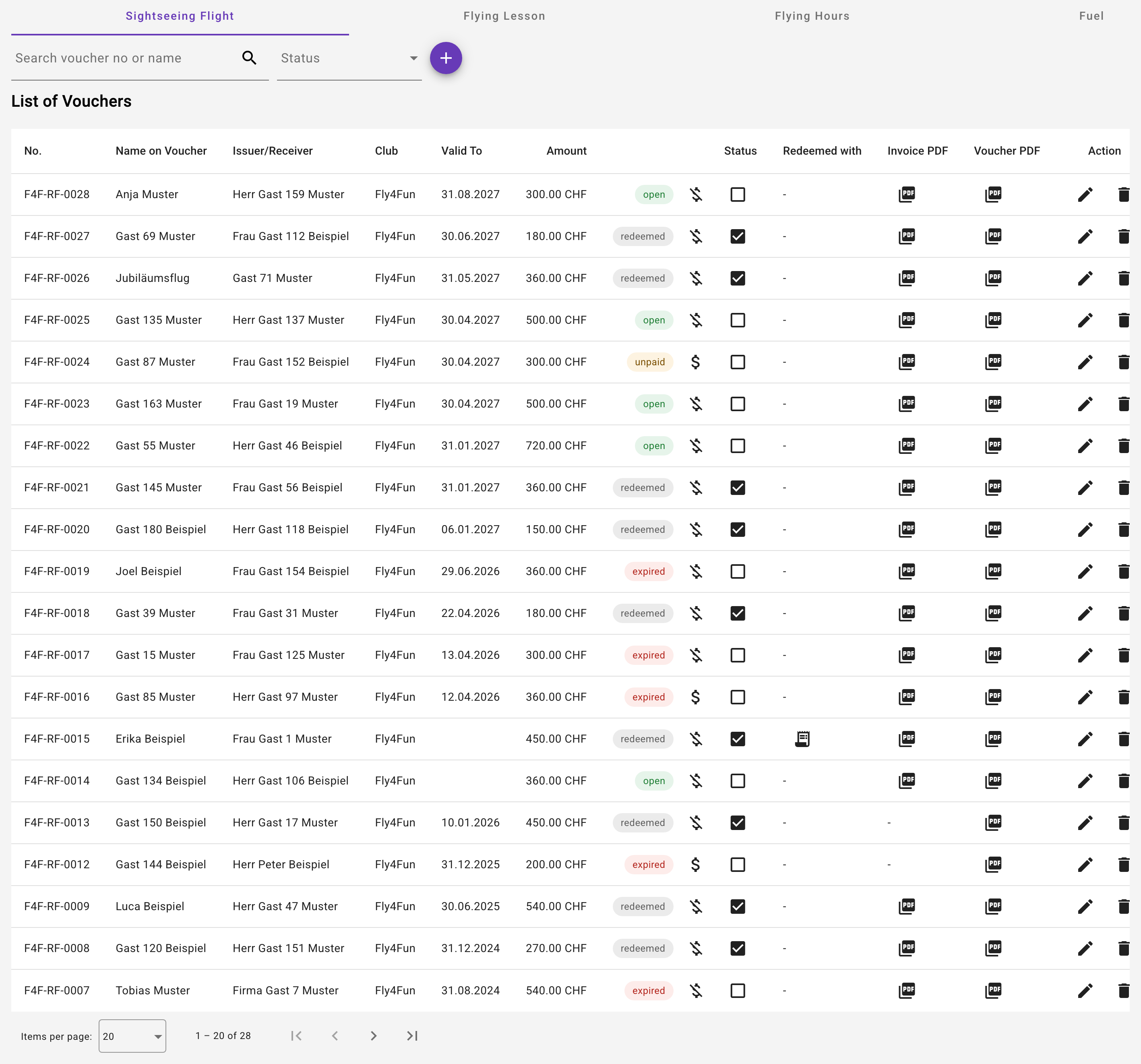
With the module Voucher shop, customers also buy vouchers online: the tabs Orders and Inquiries next to them show what arrived via the shop and the club website; an accepted order becomes a voucher in this list (see chapter 29).
Voucher number
As soon as the club has entered a prefix in the club settings (section "Vouchers"), e.g. F4F, every voucher automatically receives a unique number following the pattern F4F-RF-0024 (prefix, type code, sequential number per type). Existing vouchers are numbered retroactively. The number is printed on the voucher PDF and never changes - even if the prefix is changed later. Once assigned, numbers are never reused, not even after a voucher has been deleted.
Redeeming via the logbook (sightseeing/lesson flights)
Sightseeing and lesson flight vouchers are redeemed with the actual flight: the pilot enters the flight into the logbook as usual and picks the voucher in the "Redeem voucher" field - the search box in the list finds it by the printed number or by name. Only paid vouchers of the club that are valid on the flight date and not yet redeemed are offered.
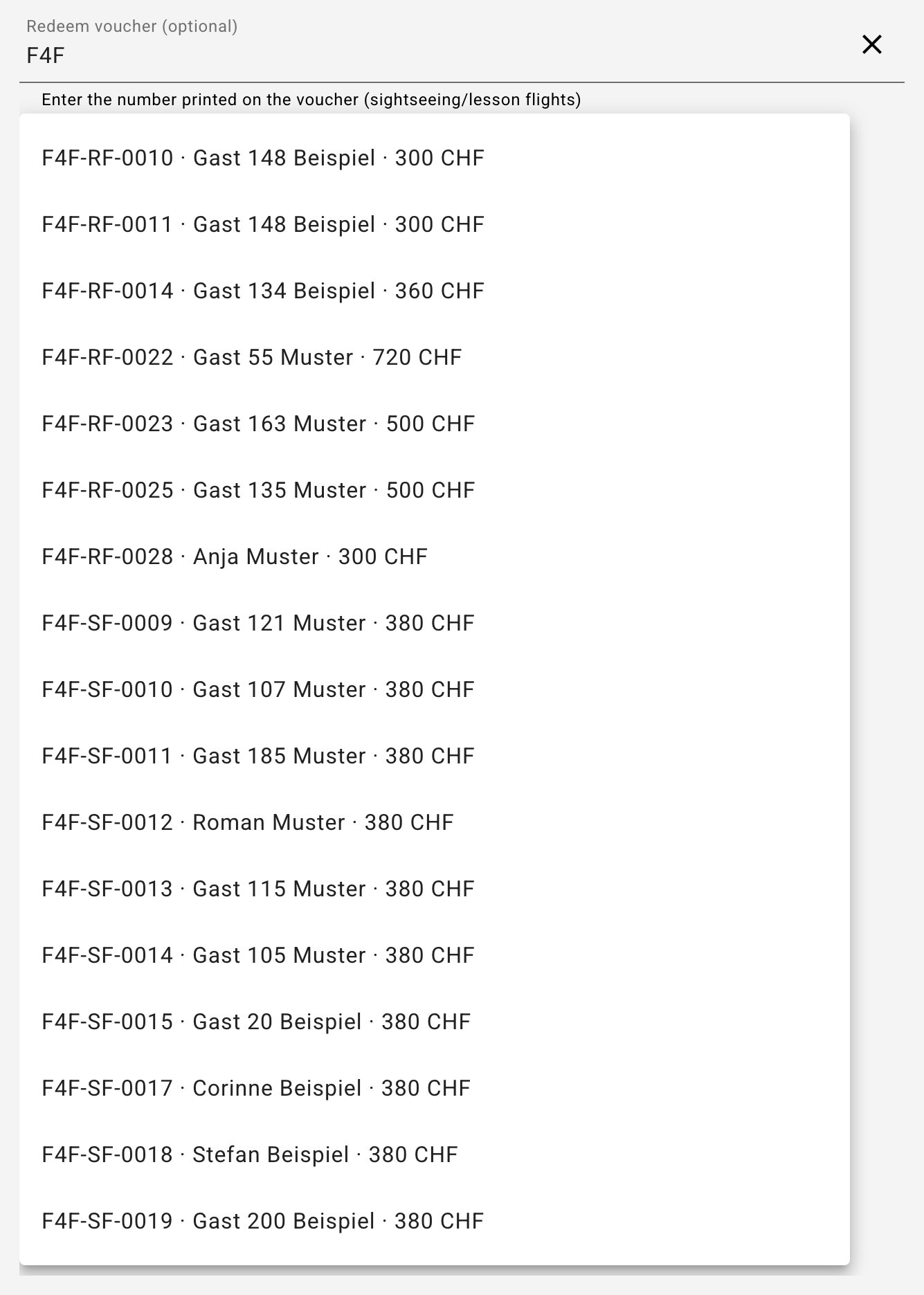
When saving, the voucher counts as redeemed; the overview shows the aircraft and date in the "Redeemed with" column. With the next invoice run the voucher amount is automatically credited on the invoice that contains this flight. Any remaining amount is forfeited - a sightseeing voucher is fully redeemed with its flight. If the logbook entry is deleted or the voucher is removed from it (as long as it has not been invoiced yet), the voucher becomes open again. The club owner can additionally still mark a voucher as redeemed manually (e.g. for special cases outside the app).
Manage vouchers
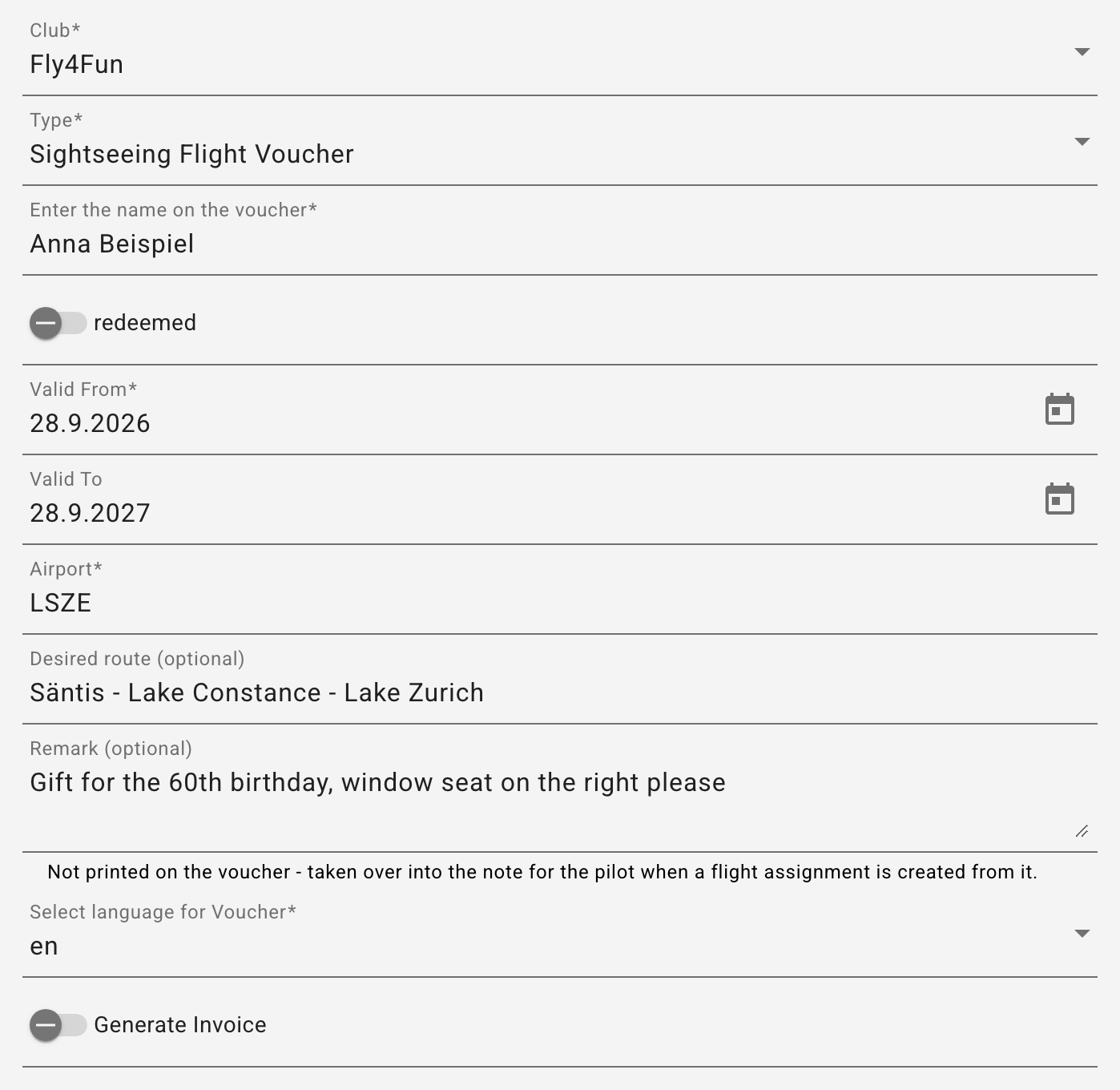
The creation of vouchers can only be performed by club owners. It is important to know that each time the voucher is saved, the PDF is regenerated. Desired route and remark: If the request already says where the flight should go, or there is something to note, enter both right on the voucher (fields below the airport). They are not printed on the voucher PDF but shown as a note icon in the list - and they are taken over into the note for the pilot as soon as a flight assignment is created from the voucher or the voucher is attached to an assignment.
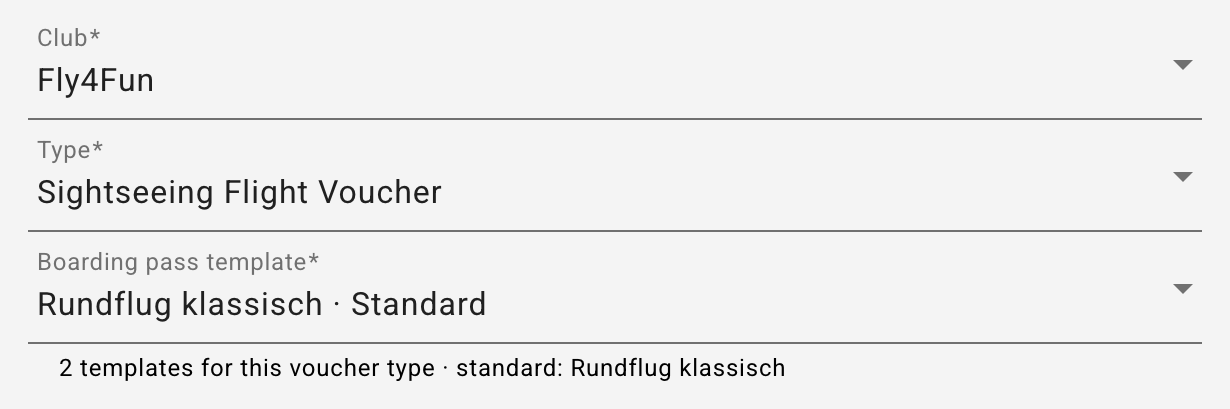
Boarding pass template: If the club has several print templates for the voucher type, the field Boarding pass template appears below the type - preselected with the standard template of the type. It sets the design the boarding pass of this voucher is printed with; the choice also applies to every reprint. With only one template the field does not appear. If the chosen template no longer exists, the note below the field says so (see Several templates for one voucher type).
In the table, the club owner can adjust the status of the voucher, as well as its total and remaining amount. The status of any invoice created for this purpose can also be recorded. Important: a voucher can only be redeemed or credited when it is marked as paid.
Marking as paid: payment method and payment date
Clicking Mark as paid opens a small dialog that asks how it was paid - Bank (QR bill, e-banking), TWINT, Card (terminal), Cash or Other (with a note, e.g. offset or raffle prize) - and when: the payment date is preset to today, can be set back, never into the future, and becomes the booking date in the export. The payment method is mandatory; without a choice the button stays locked. For bookkeeping this is the decisive detail: it posts to cash, bank or the TWINT account and assigns card and TWINT fees.
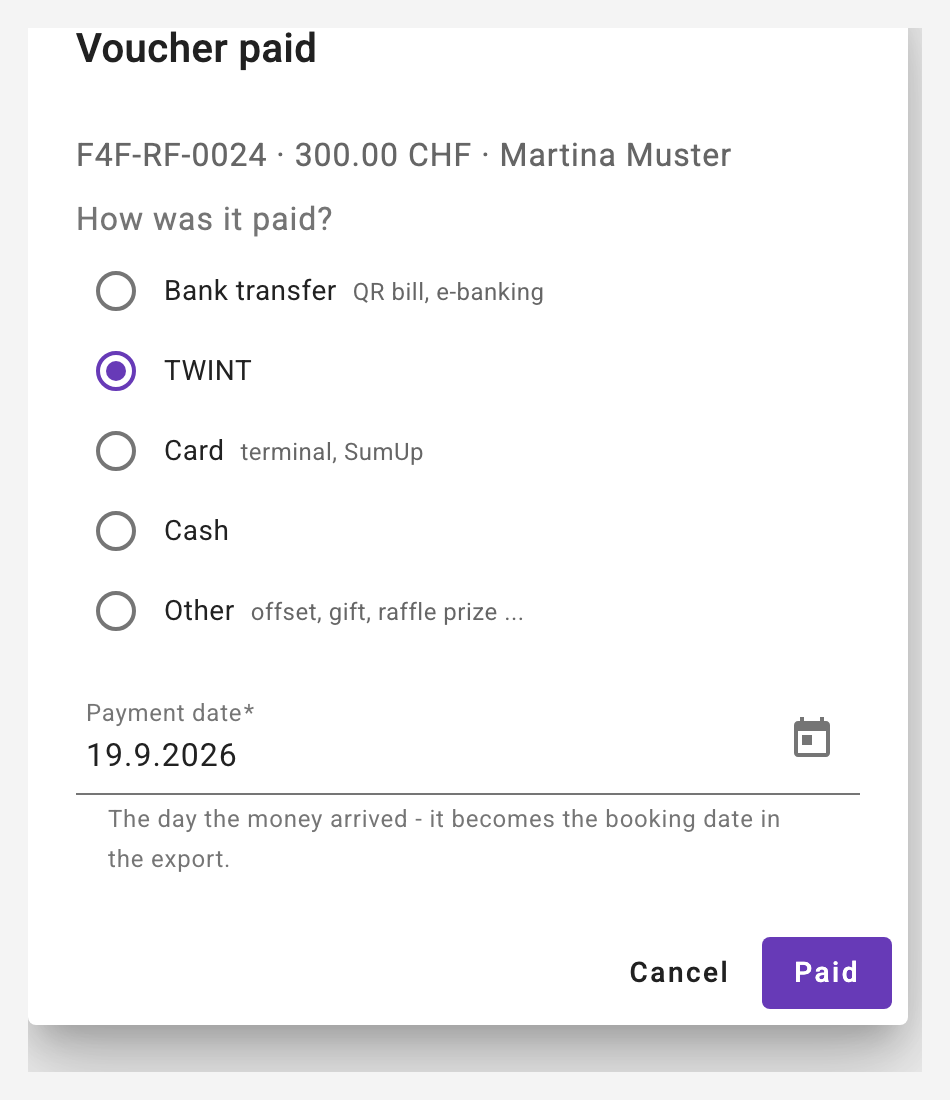
The list then shows the payment method with its date below the status chip, e.g. "TWINT · 21.08.2026". A voucher that was marked as paid before this feature existed shows Record payment method instead - the same dialog, preset with the existing date. If a voucher is set back to unpaid, date and payment method are cleared. When the payment reconciliation books the voucher invoice from the bank statement, the voucher automatically carries "Bank" - a payment method recorded by hand is never overwritten.
Invoice receiver from the contacts
For sightseeing and trial flight vouchers the invoice receiver (the buyer) is a club contact - this requires the "Passenger flights" module (see 15.3). The step "Invoice receiver" starts with a contact picker: anyone recorded before - as a trial student, sightseeing guest or buyer - is suggested while typing, and selecting fills salutation, name, address, country and phone. All fields stay editable. What you change here stays on the voucher; empty fields of the contact are completed from the voucher when saving, existing contact data is never overwritten. If you type a new person, the contact is created automatically when saving (a contact of the club with the same name is reused). The e-mail is stored on the contact only - for follow-ups and for sending the voucher PDF.
The checkbox "… is also the person on the voucher" copies the contact's name into the name on the voucher - for the case where someone buys the sightseeing flight for themselves. For a gift the name on the voucher stays the person it is given to; that person becomes the guest when you "Create flight assignment".
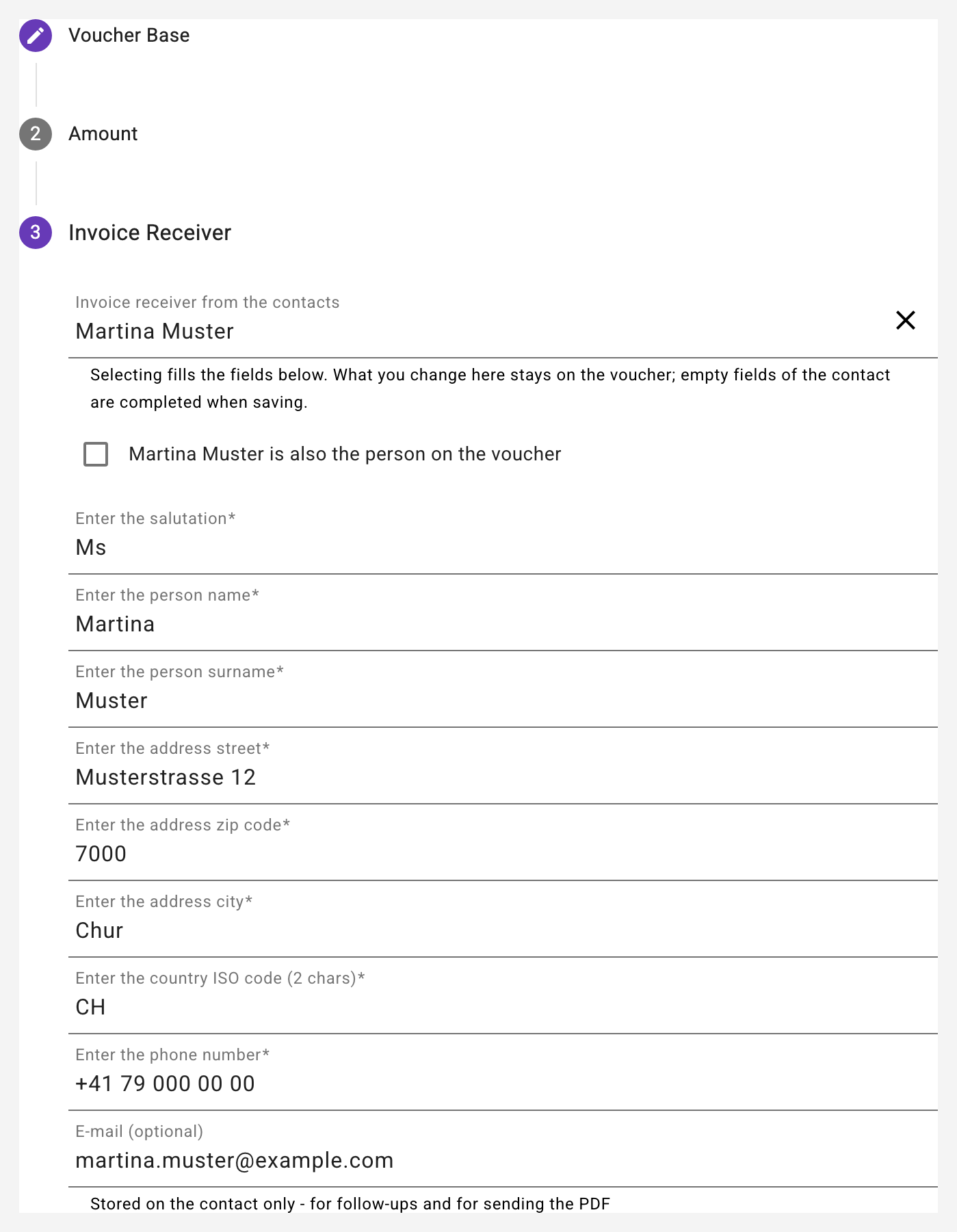
The voucher keeps its own copy of the address: PDF and QR invoice do not change when the contact is edited or deleted later.
Selling a voucher from the assignment book and from the contacts page. Every running flight assignment without a voucher has a "Sell a voucher" button (see 18.7): the form opens pre-filled with club, kind of flight, the guest as the person on the voucher and their contact as invoice receiver, valid from today, invoice ✓ as soon as a voucher IBAN is configured - only the amount is left to enter. After saving, the voucher is attached to the assignment and the page returns to the assignment book. The same button is available on the contacts page for every contact.
Defaults. A new voucher starts with country "CH", the language of the app and the airport of the club's most recently recorded voucher. For a flight hours voucher, the button "Take over the member's address" copies the address of the selected member as the issuer.
Settings
The settings for the vouchers are made under the club. An IBAN number can be defined (ATTENTION: as long as no IBAN has been defined, you cannot select the "Create invoice" flag). The prefix for the voucher number is also entered here. It is possible to upload a photo for the foreground as well as for the background. It is important to note that the image for the foreground should be created with a little transparency, because the text for the voucher will be printed on this image.
Flight hours voucher for pilots
With this type of voucher, you can directly select the member in the club for which the voucher is intended. Thus, when creating invoices, available vouchers that are marked as paid are automatically credited with the corresponding amount - with sufficient credit also spread over several invoices and aircraft. The individual credits can be inspected via the receipt icon in the "Redeemed with" column of the overview. If an invoice is deleted, the amount is added back to the voucher and taken into account in the next invoice.